使用上下文的 LLM
构建一个基于上下文关联的 ServiceNow 事件分类智能体
你将完成的任务
- 创建并配置一个带有输入和输出参数的新智能体
- 编写系统提示词和用户提示词,然后用示例事件测试智能体
- 添加 Context Grounding 防止幻觉,并配置一个 Assignee Lookup(处理人查询)工具
- 使用 Evaluations 验证智能体的表现
目标
在 Agent Builder 中创建一个 ServiceNow 事件分类智能体,配置它的提示词,学习如何用 Context Grounding(上下文关联)让它扎根于真实数据,并构建 Evaluations(评估)来保障质量、测试可靠性。
Context Grounding 如何工作
没有上下文关联时,LLM 可能给出听起来合理、实际却是错误的类别–子类别组合——你的系统里根本不存在的组合。Context Grounding 把智能体锚定到真实数据源,让每个决策都能追溯到上下文中的有效条目。
当智能体给事件分类时,它会引用你数据中真实存在的类别和子类别组合,从而杜绝凭空发明新组合的风险。
Evaluations 步骤带来了什么
Evaluations(评估)让你在部署智能体之前,对它批量运行测试用例。你为一组示例事件定义期望输出,运行评估,然后衡量智能体在各种边缘情况下的表现。这是一种回归测试——它能确保提示词改动或模型升级不会破坏已有功能。
步骤
1. 创建并配置智能体
在 Studio Web 中,创建一个新的 Agent Solution(智能体解决方案)。
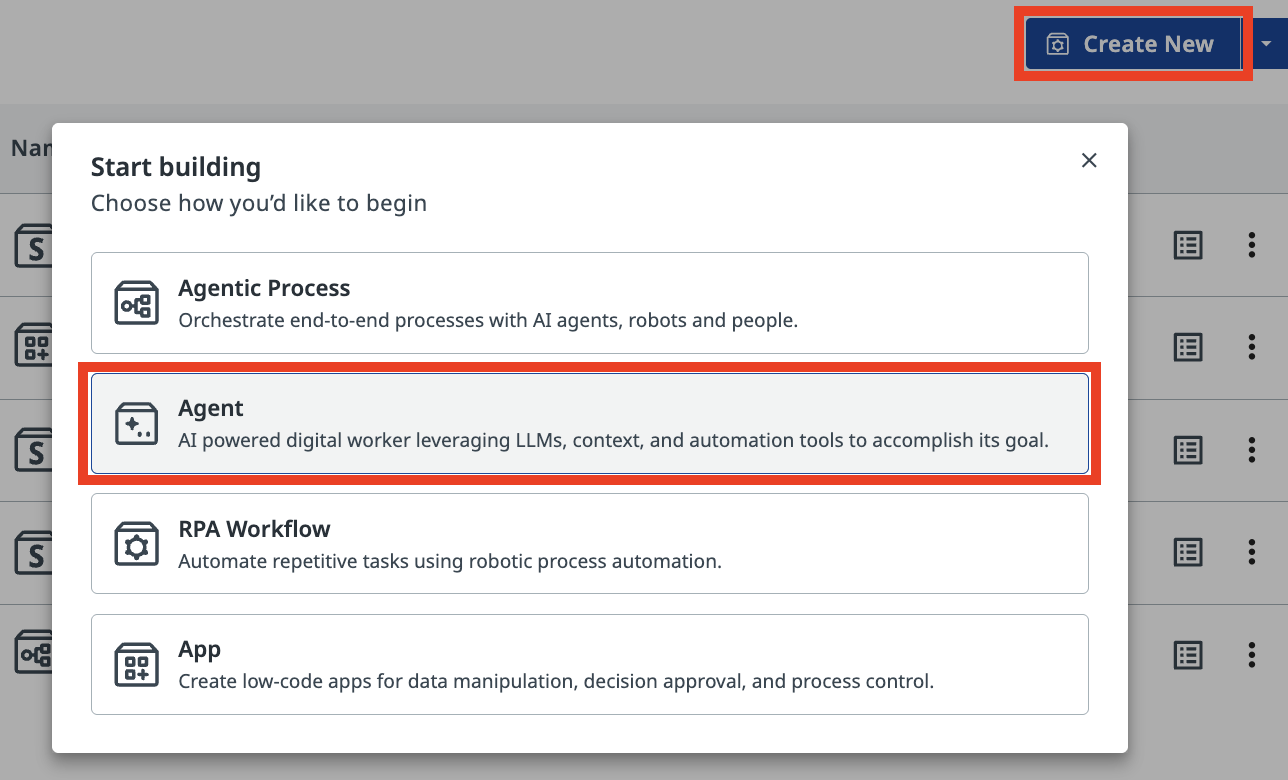
Autopilot
创建智能体时,Studio Web 可能会建议使用 Autopilot,让 AI 助手自动生成解决方案。你可以先关掉它、手动构建(我们这里就是这么做的),之后再找时间体验 Autopilot。
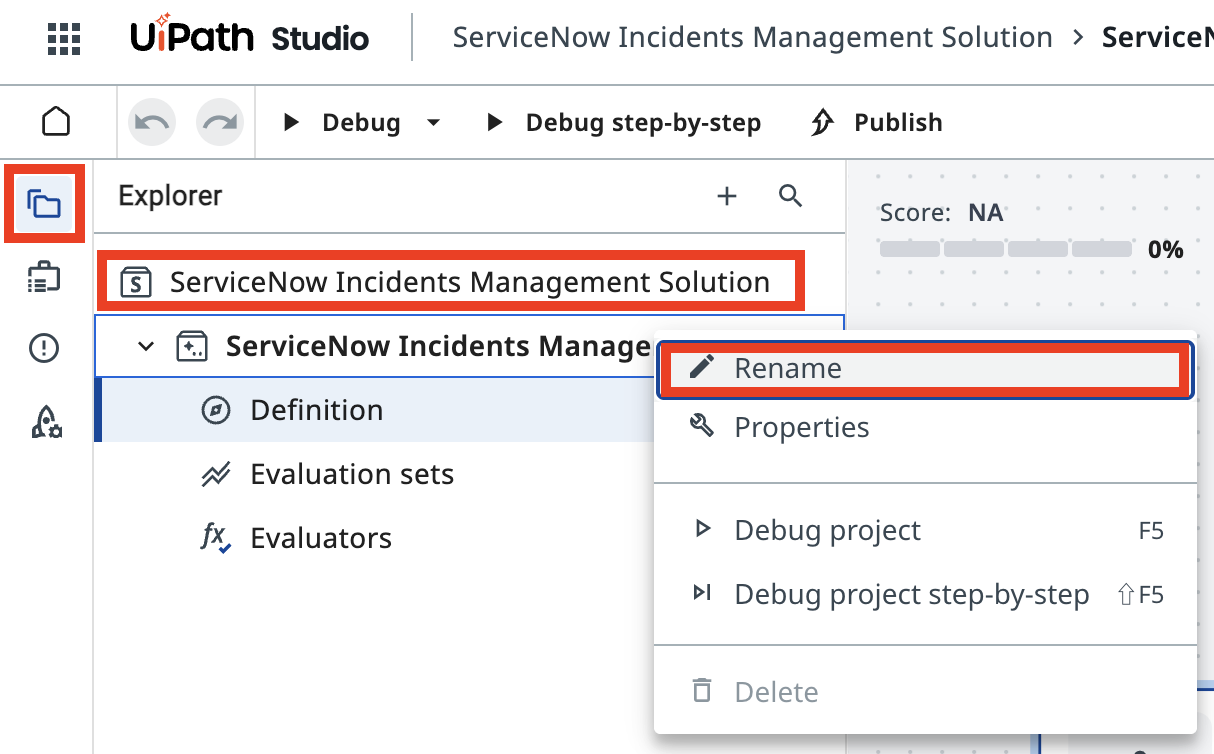
重命名解决方案,方便以后查找,例如:
-
Solution Name(解决方案名称):
-
Agent Name(智能体名称):
参数
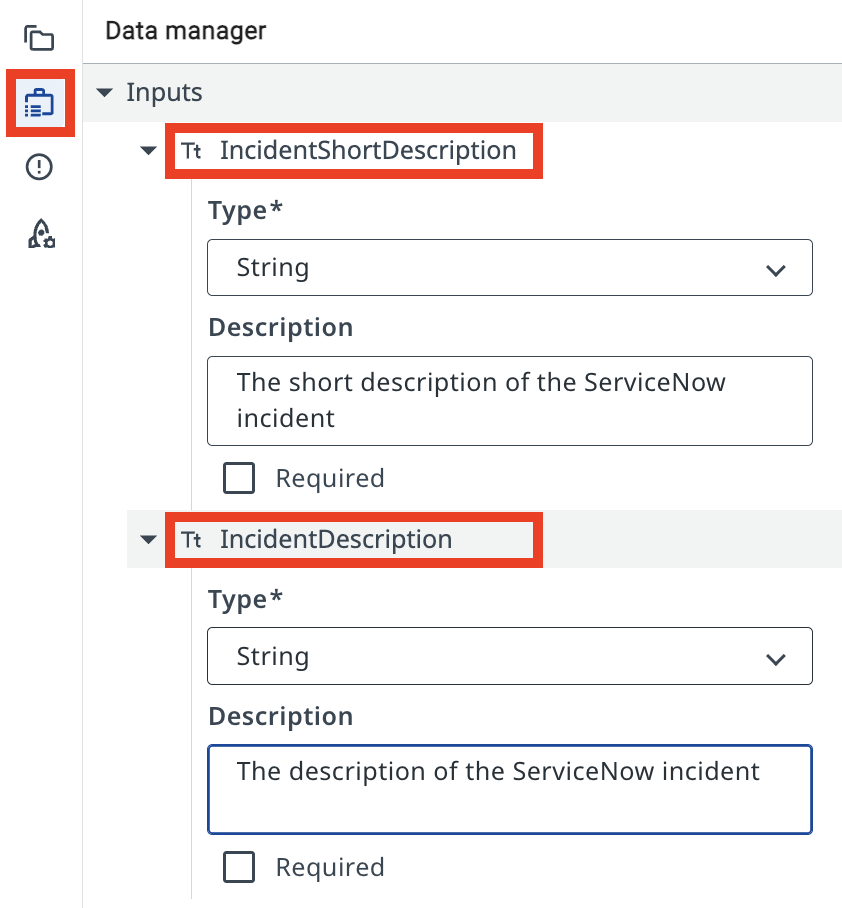
智能体参数让你的智能体像其他活动或 RPA 流程一样,接收业务案例的信息并返回结果。这样你就可以把 Orchestrator 触发器中的信息传给智能体,或者用一个智能体的输出去启动另一个自动化。
打开 Data Manager 面板。添加以下 Input Arguments(输入参数)。类型选择 String。
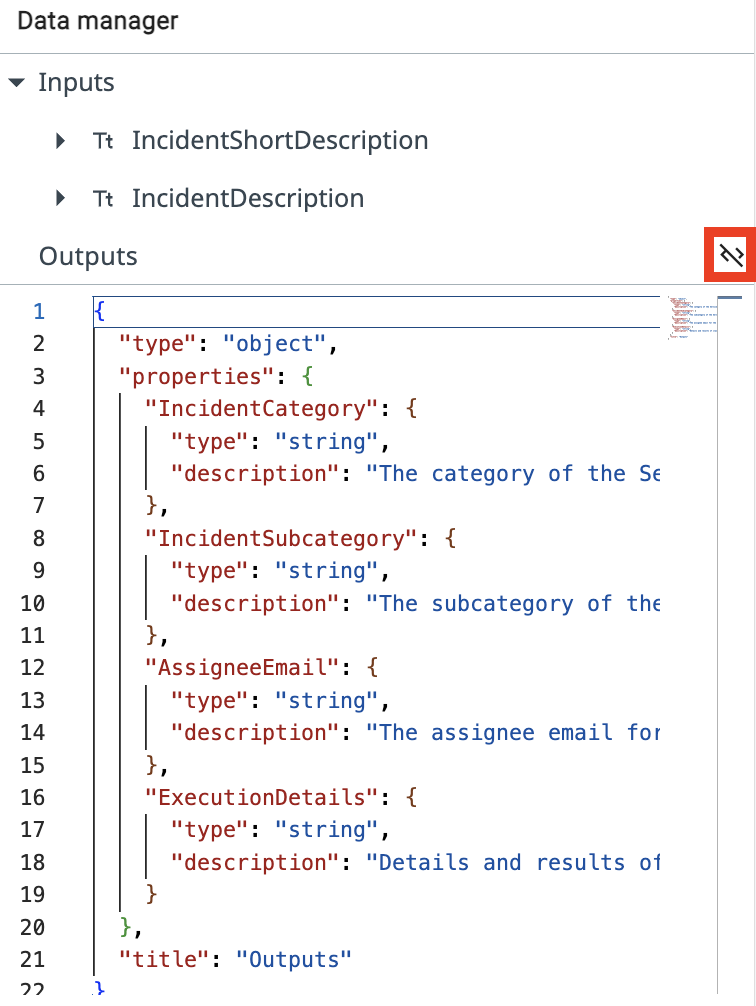
幸运的是,你可以切换到 JSON 编辑器模式,粘贴下面的 JSON schema,一次性导入所有参数:
{
  "type": "object",
  "properties": {
    "IncidentCategory": {
      "type": "string",
      "description": "The category of the ServiceNow incident"
    },
    "IncidentSubcategory": {
      "type": "string",
      "description": "The subcategory of the ServiceNow incident"
    },
    "AssigneeEmail": {
      "type": "string",
      "description": "The assignee email for the ServiceNow incident"
    },
    "ExecutionDetails": {
      "type": "string",
      "description": "Details and results of classification"
    }
  },
  "title": "Outputs"
}
2. 配置智能体提示词
定义好输入和输出数据后,先来理解 System Prompt(系统提示词)与 User Prompt(用户提示词)的区别,再动手编写。
系统提示词提供一致的指导原则,定义智能体的角色和能力;用户提示词则把智能体的注意力引向具体任务和输入参数。理解这一区别,对设计和实现既能完成复杂任务、又能守住行为边界的 AI 智能体至关重要。
系统提示词
系统提示词让你用自然语言描述智能体的角色、目标和约束。你可以在这里写下它要遵守的规则,以及它什么时候该使用某些工具、升级或上下文。
用户提示词
用户提示词让你规划输入/参数如何传给智能体,也可以在这里展示系统提示词中会如何引用某些输入。
You are a ServiceNow Incidents categorization agent, an AI assistant tasked with managing newly created ServiceNow incidents. Your primary responsibility is to analyze incident details and determine the correct Category, Subcategory, and Assignee email address for each incident.

# Categorize the incident

- Determine the Incident Category and Subcategory based on Description and Short Description.
- Once categories have been established, determine the on-duty Assignee email address who handles this type of requests.

# Summarize the actions taken.

In the ExecutionDetails, provide:
- Incident Category
- Incident Subcategory
- Assignee Email
- Reasoning for your decisions
Analyze and categorize the following ServiceNow incident:

Incident Short Description: {{input.IncidentShortDescription}}
Incident Description:       {{input.IncidentDescription}}

Determine the appropriate category, subcategory, and assignee email for this incident based on the provided information.
我们先用下面这份示例事件测试智能体,观察它在没有上下文关联时的表现。运行智能体并提供以下输入参数:
Every time I try to open the CRM software, it crashes immediately. I've already tried reinstalling it.
在输出面板中,你会看到智能体把请求发送给 LLM 并收到响应。但它是怎么确定类别名称和处理人邮箱的呢?
没有上下文关联时,智能体可能会返回信心十足却不准确的类别和处理人信息——那些类别在你的系统里根本不存在。这就是幻觉问题。
为了让响应扎根于真实类别,并查到值班专家的邮箱,你要添加两样东西:
- Context Grounding(上下文关联)
- Assignee Lookup(处理人查询)自动化
3. 添加上下文关联
Context Grounding 为智能体提供一个结构化数据源。这个上下文名为 ServiceNow Incidents Categorization Information,包含我们训练组织中使用的有效 Category–Subcategory(类别–子类别)组合。它列出了可用的类别和子类别,并为每一项附上简短说明:
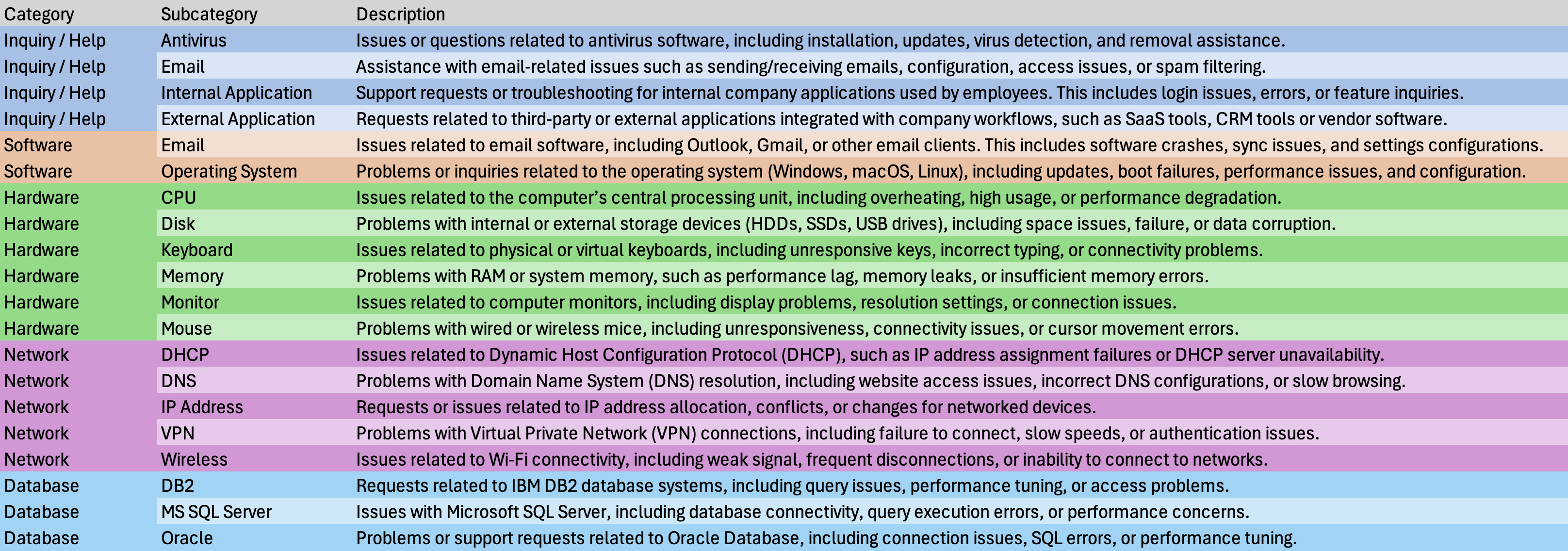
这样,智能体就有了给任何新工单分类所需的结构化数据。在智能体配置的 Contexts 区域点击 Add context(添加上下文)。
如果你在 Canvas 模式下,请使用 Contexts 旁边的 "+" 按钮。
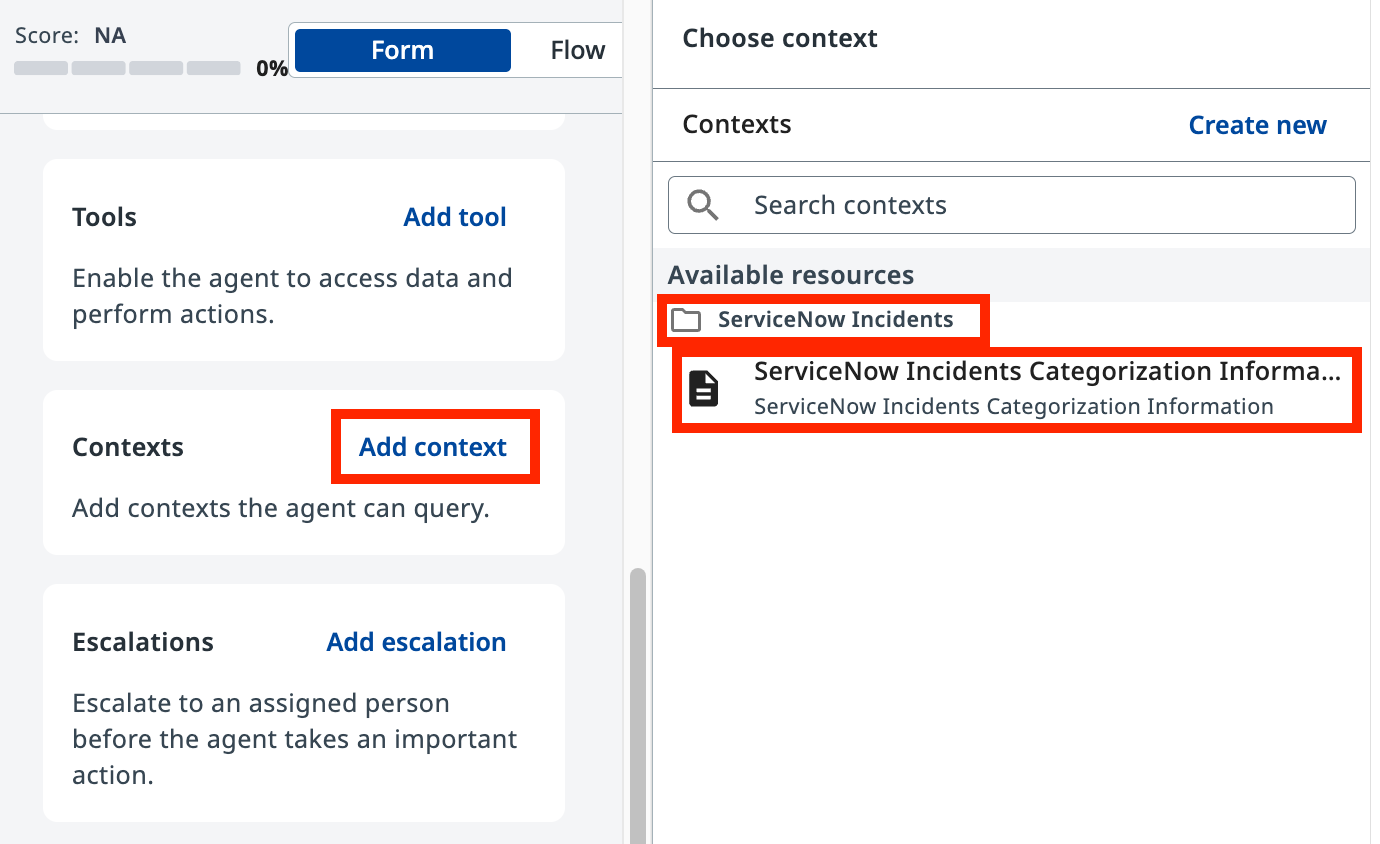
从 ServiceNow Incidents 文件夹下的可用资源中选择 ServiceNow Incidents Categorization Information,并添加以下描述:
4. 添加处理人查询工具
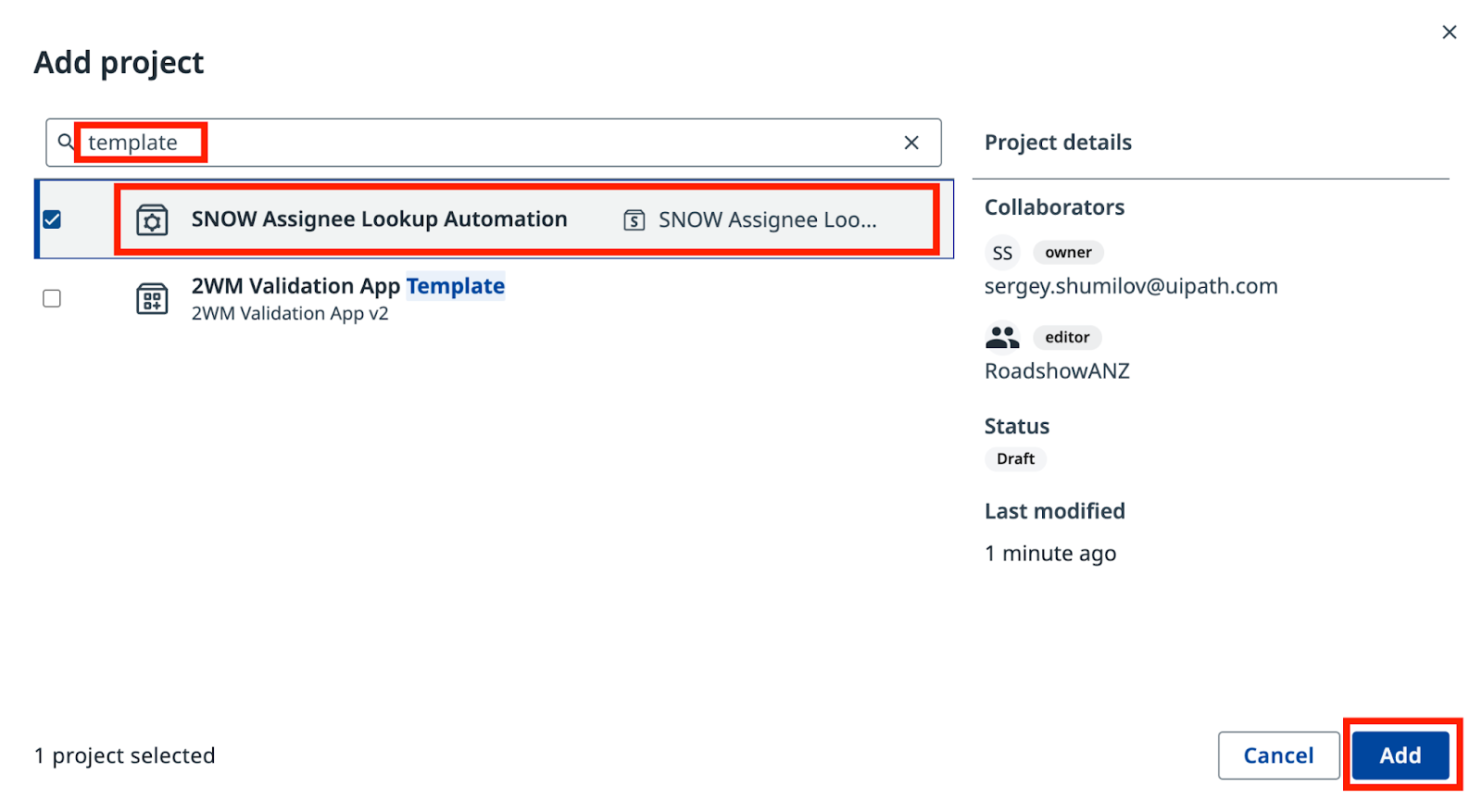
现在,导入 SNOW Assignee Lookup Automation 项目。
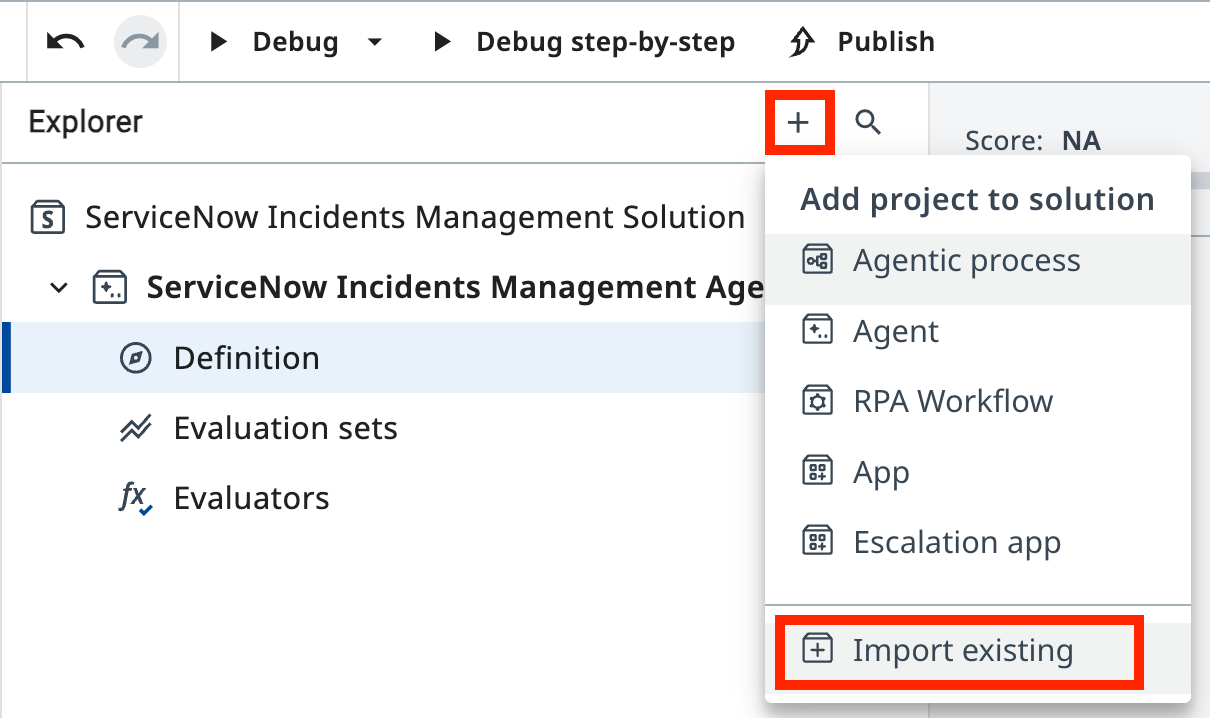
点击 Explorer 中的 + 按钮,选择 Import existing(导入现有项目),把它加入你的解决方案。
搜索 "SNOW Assignee",选择 SNOW Assignee Lookup Automation。
把这个自动化作为工具添加到智能体。在 Tools 区域点击 Add tool(添加工具),然后选择 RPA workflow。
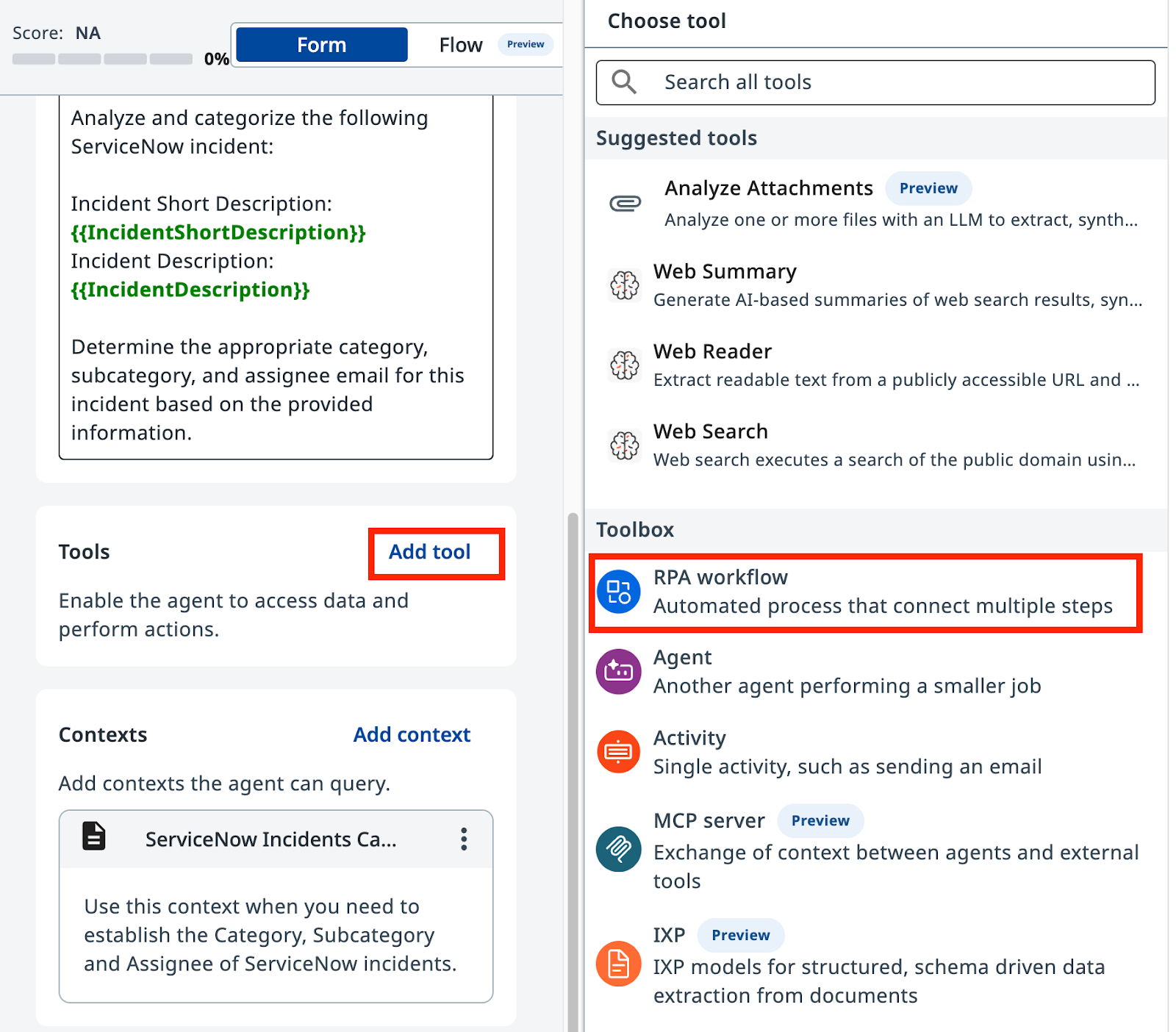
从当前解决方案的可用工作流列表中选择 SNOW Assignee Lookup Automation。
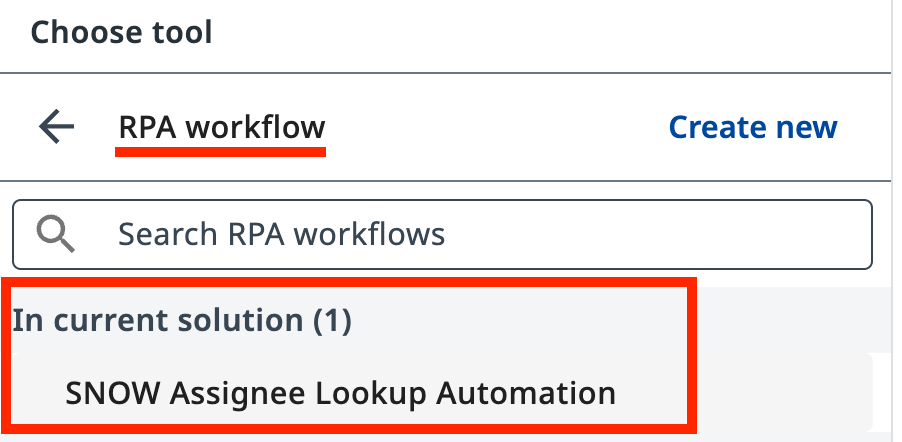
为工具添加描述,让智能体知道什么时候使用它:
5. 更新系统提示词
查看改动
为了让提示词反映新工具的使用,我们需要做以下修改。请仔细对照:
--- Original
+++ With Context and tools

# Categorize the incident.

-- Determine the Incident Category and Subcategory based on Description and Short Description.
+- Determine the Incident Category and Subcategory based on Description and Short Description from Categorization Information Context.
+- Context contains table with only possible Category-Subcategory pairs. Do not mix Category-Subcategory pairs if specific pair is not present in the context. Do not generate new categories if they are not present in the context.
+- Pick the Category-Subcategory pair that aligns well with Incident Descriptions. If you are not sure or no category pair is a clear match, return "Unknown" as category.

-# Once categories have been established, determine the on-duty Assignee email address who handles this type of requests.
+# Once categories have been established, determine the on-duty Assignee email address who handles this type of requests by calling Assignee Lookup automation.

# Summarize the actions taken.
In the ExecutionDetails, provide:
- Incident Category
- Incident Subcategory
- Assignee Email
- Reasoning for your decisions
You are a ServiceNow Incidents categorization agent, an AI assistant tasked with managing newly created ServiceNow incidents. Your primary responsibility is to analyze incident details and determine the correct Category, Subcategory, and Assignee email address for each incident.

# Categorize the incident

- Determine the Incident Category and Subcategory based on Description and Short Description from Categorization Information Context.
- Context contains table with only possible Category-Subcategory pairs. Do not mix Category-Subcategory pairs if specific pair is not present in the context. Do not generate new categories if they are not present in the context.
- Pick the Category-Subcategory pair that aligns well with Incident Descriptions. If you are not sure or no category pair is a clear match, return "Unknown" as category..
- Once categories have been established, determine the on-duty Assignee email address who handles this type of requests by calling Assignee Lookup automation.

# Summarize the actions taken.

In the ExecutionDetails, provide:
- Incident Category
- Incident Subcategory
- Assignee Email
- Reasoning for your decisions
用同一个 CRM 崩溃示例事件再次测试智能体。这次查看 Execution Trace(执行轨迹),观察:
- 智能体调用 LLM 分析事件
- 智能体查询 Context Grounding 数据
- 智能体调用 Assignee Lookup 工具
- Result 选项卡中的最终分类结果
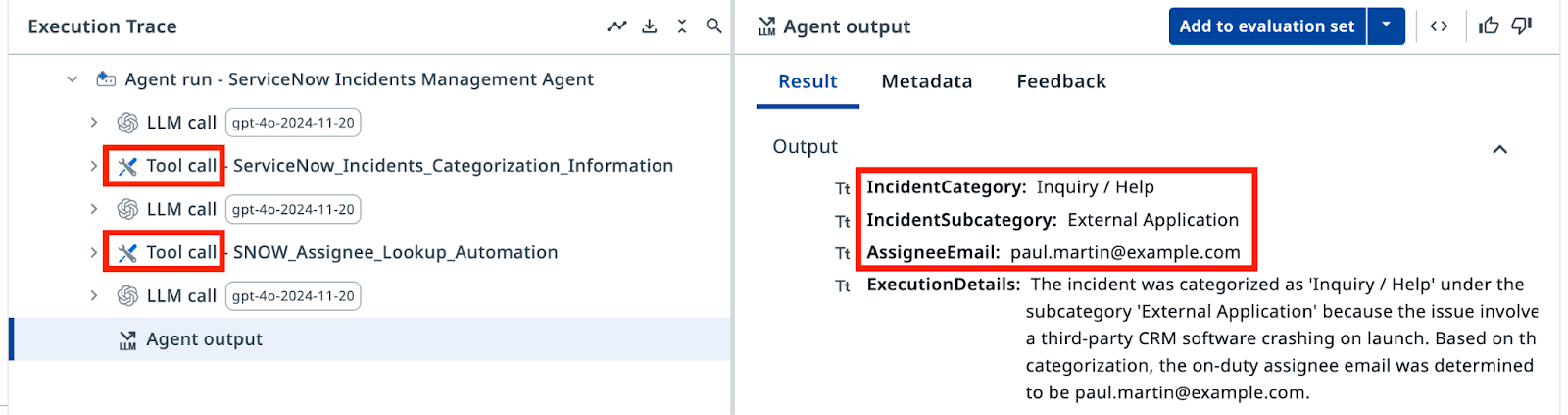
现在,输出应该只包含有效类别,以及从查询工具取回的处理人邮箱——没有幻觉。恭喜!
6. 使用 Evaluations 进行测试
Evaluations(评估)是一种回归测试,会针对预先定义的一组输入自动验证结果。现在,先运行这个评估集,确认智能体能正确处理全部八个场景。下一步你还会进一步探索 Evaluations。
前往 Evaluation sets 选项卡,点击 Import(导入)。
评估集
把下面的 JSON 粘贴到文本框中。导入后你应该能看到多条评估。
{
  "fileName": "evaluation-set-1761459564848.json",
  "id": "18c3387f-00ed-4deb-b4e8-886f1164f517",
  "name": "SNOW Categorization Evaluation",
  "batchSize": 10,
  "evaluatorRefs": [
    "33c47b32-563b-4d16-b323-11e187f954be"
  ],
  "evaluations": [
    {
      "id": "811adc0e-aff0-434f-99fa-f32ed562bf1d",
      "name": "Database_MSSQL",
      "inputs": {
        "IncidentShortDescription": "Database connection issue from RPA automations",
        "IncidentDescription": "I'm building an RPA workflow that connects to production instance of Microsoft SQL Server and it fails with error \"IP Address not authorized to perform this query\". Could you authorize my IP address: 123.23.41.165"
      },
      "expectedOutput": {
        "IncidentCategory": "Database",
        "IncidentSubcategory": "MS SQL Server",
        "AssigneeEmail": "bud.richman@example.com",
        "ExecutionDetails": ""
      }
    },
    {
      "id": "789d90ad-fca8-44f3-8179-d1ca95317a1f",
      "name": "Software_Email",
      "inputs": {
        "IncidentShortDescription": "I can't send emails to external addresses",
        "IncidentDescription": "I can receive emails just fine, but every time I try to send one to anyone outside the company domain, it fails. I'm not sure if it's an issue with my email client or something on the server side. Could you assist me with this?"
      },
      "expectedOutput": {
        "IncidentCategory": "Software",
        "IncidentSubcategory": "Email",
        "AssigneeEmail": "savannah.kesich@example.com",
        "ExecutionDetails": ""
      }
    },
    {
      "id": "97bc068e-8394-40c8-ad31-e0832e93f697",
      "name": "Inquiry_Antivirus",
      "inputs": {
        "IncidentShortDescription": "Laptop slowing down",
        "IncidentDescription": "I noticed my laptop is slowing down every time a security scan starts running, can you please look into this?"
      },
      "expectedOutput": {
        "IncidentCategory": "Inquiry / Help",
        "IncidentSubcategory": "Antivirus",
        "AssigneeEmail": "paul.martin@example.com",
        "ExecutionDetails": ""
      }
    },
    {
      "id": "754cf068-5e59-4436-8733-f92ebca7fa55",
      "name": "Inquiry_ExternalApplication",
      "inputs": {
        "IncidentShortDescription": "CRM software crashes on launch",
        "IncidentDescription": "Every time I try to open the CRM software, it crashes immediately. I've already tried reinstalling it."
      },
      "expectedOutput": {
        "IncidentCategory": "Inquiry / Help",
        "IncidentSubcategory": "External Application",
        "AssigneeEmail": "paul.martin@example.com",
        "ExecutionDetails": ""
      }
    },
    {
      "id": "adc73bed-75e6-45b3-801c-5919df70ec6d",
      "name": "Hardware_Monitor",
      "inputs": {
        "IncidentShortDescription": "Display flickers occasionally",
        "IncidentDescription": "My screen flickers randomly throughout the day. It's not completely unusable, but it's very distracting."
      },
      "expectedOutput": {
        "IncidentCategory": "Hardware",
        "IncidentSubcategory": "Monitor",
        "AssigneeEmail": "aqib.mushtaq@example.com",
        "ExecutionDetails": ""
      }
    },
    {
      "id": "3d139ef0-05df-488c-b56f-4165258900dc",
      "name": "Network_DNS",
      "inputs": {
        "IncidentShortDescription": "System cannot reach certain websites",
        "IncidentDescription": "Some websites are not loading on my system, but they work fine on my phone. I suspect there's an issue with my network settings."
      },
      "expectedOutput": {
        "IncidentCategory": "Network",
        "IncidentSubcategory": "DNS",
        "AssigneeEmail": "david.dan@example.com",
        "ExecutionDetails": ""
      }
    },
    {
      "id": "9c7e9e2a-8e3f-453d-894d-d5ba12a80932",
      "name": "Network_VPN",
      "inputs": {
        "IncidentShortDescription": "VPN connection drops frequently",
        "IncidentDescription": "My VPN keeps disconnecting randomly, making it hard for me to work remotely."
      },
      "expectedOutput": {
        "IncidentCategory": "Network",
        "IncidentSubcategory": "VPN",
        "AssigneeEmail": "bud.richman@example.com",
        "ExecutionDetails": ""
      }
    },
    {
      "id": "3d114888-f0b0-400b-82f3-ed20aa300df3",
      "name": "Software_OS",
      "inputs": {
        "IncidentShortDescription": "Windows update failure",
        "IncidentDescription": "I tried to install the latest Windows update, but it keeps failing with error code 0x80070002"
      },
      "expectedOutput": {
        "IncidentCategory": "Software",
        "IncidentSubcategory": "Operating System",
        "AssigneeEmail": "savannah.kesich@example.com",
        "ExecutionDetails": ""
      }
    }
  ],
  "modelSettings": [],
  "createdAt": "2025-10-26T06:19:24.848Z",
  "updatedAt": "2025-10-26T06:19:24.848Z"
}
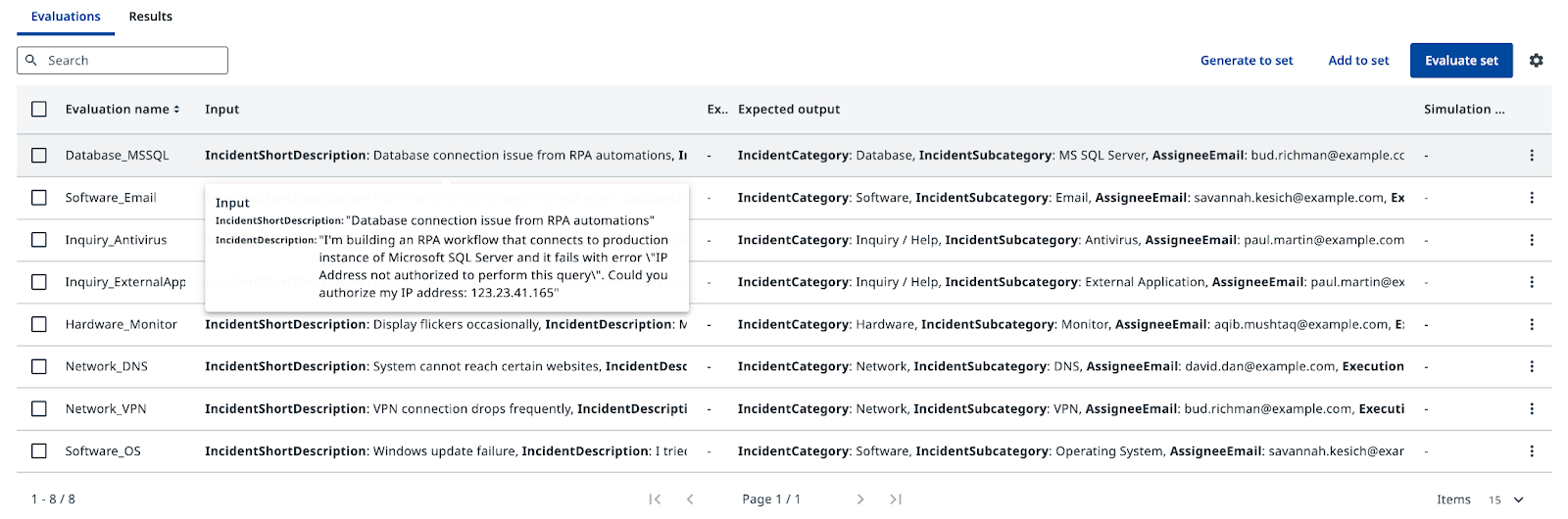
点击 Evaluate set(运行评估集),查看结果。每个测试用例都会把你的智能体运行一次,你能看到输出是否与期望值匹配。当你更新提示词或更换模型时,Evaluations 帮你守住质量、捕捉回归——确保为了解决一个问题而调整提示词时,不会顺手弄坏另一个用例。
你的智能体的分类逻辑已经就绪。下一步,你会把它连接到 ServiceNow。