Author the Case (Block 3d)
The Maestro Case Plan binds everything you have built into one lifecycle, and this block deliberately stops at authored and validated, never run. The split matters: a plan that will not validate is a design problem; a plan that validates and then misbehaves is a binding problem. Kept apart, each is debugged where it lives. Merged, the second gets debugged through redeploy cycles at several minutes each.
The Work That Remains describes exactly this shape, with an insurance claim as its own example: the case owns the lifecycle (opened, investigating, decided, closed); the stable stretches inside a stage run as declared workflow on rails, exact and tokenless; and where a stretch needs judgement, an agent takes one well-defined goal and finds the path at runtime. The three nest, and you are building all three at once.
First: register the Action App
The case is generated, not written: the case skill converts sdd.md into the plan and leaves a list of what only you can fill.
The two human gates are action tasks bound to the app's known contract. So the app is registered now: standalone, beside the solution, an empty page plus its schema. That is enough for the case to wire both gateways and prove every route from the command line; the screens replace the empty page at 3f and the case is never touched again.
The App contract is settled once and not revisited, because changing it after the case binds breaks the bindings at both gateways. And the app build is a natural piece to delegate to a sub-agent: one contract file defines its entire I/O, and nothing about it needs this block's context.
The prompt
# Build — the Maestro Case

Use the **`uipath-maestro-case`** skill and build the case from `sdd.md` — as a project inside your existing solution in Build folder. **Authoring `caseplan.json` here, do not run it** — deploying and testing the case is the next block.

Generate the plan, do not write it: from inside the solution folder, `uip maestro case init` the project; `uip maestro case sdd resolve sdd.md --out tasks/registry-resolved.json`; `uip maestro case sdd convert sdd.md --resolved tasks/registry-resolved.json --out <project>/caseplan.json`. What convert lists under `Data.Unresolved[]` is the work left — close each entry the way the skill says, and nothing else by hand. Convert writes a few shapes that run wrong on this case; `cookbook.md` names them and `check_caseplan.py` flags them, so fix those in `caseplan.json`. Anything else convert gets wrong, log it; fix `sdd.md` and convert again only before any splice or hand edit — every one after it is redone. Diagram reads as the process: the decision path left to right, Denied below Approved on the right, Missing details below Intake and Awaiting inspection below Eligibility screening, nothing overlapping (`cookbook.md`, *Canvas*).

The app and the case are two separate builds — if your agent can delegate to a subagent, build and register the app there and keep this context for the case; either way, write the app's name, deployment id and folder into `PROGRESS.md` before starting the case.

Register the Coded Action App first, with the shape of **`contracts/review-task.md`** — the two human gateways are `action` tasks bound to it, and an empty page is enough to wire and prove them. Use `uipath-coded-apps`: scaffold it **standalone, beside the solution** (`create-vite`, the React + TypeScript template — `-t Action` belongs to `publish`, not to the scaffold), put the contract in `action-schema.json`, `uip codedapp publish -t Action`, `uip codedapp deploy --folder-key <your seat folder>`. If the publish hangs or fails at *Registering coded app*, it is a known tool defect, not your app — `known-issues/cli-commands.md`. Then author the case that binds it by name with that folder as its explicit `folderPath`. Its screens are built at `3f`, after a run has populated the record.

Everything the case binds must already exist and be published — the six RPA processes, the Data Fabric entity, the seven Agents, the Action App's contract — which is what your task list ordered. The case skill keeps its own `tasks/` folder beside the plan (`registry-resolved.json`, its resolution ledger); that is not your `tasks.md`, and neither replaces the other.

Check it before you go any further:

```bash
python3 3d-case/check_caseplan.py <path-to>/caseplan.json
```

Run the script as it ships — reimplementing its rules in another language is not the gate. Read the checker's rules even if it passes — each is a shape that packs, deploys and then fails on a live claim.

**Done when:**
- `uip maestro case validate <path-to>/caseplan.json --strict --sdd sdd.md` reports `Valid` — the **full** validator, not `--skeleton-v2`; every error it prints is a runtime failure waiting, not validator strictness
- every entry convert listed under `Data.Unresolved[]` is closed
- `python3 3d-case/check_caseplan.py` reports no referential problems — it checks what the validator cannot: layout, argument-named outputs, connector inputs, skips on human gates
- the plan opens in Studio Web: `uip solution upload Build/ClaimCase-<seat>` has run.
Steps:
- Scaffold and deploy the Coded Action App
claim-review-<seat>(beside the solution, stand-alone) - Generate the case plan from
sdd.md:sdd resolve, thensdd convert, then close what convert lists as unresolved - Fix the shapes
check_caseplan.pynames - Validate:
uip maestro case validate --strict --sdd sdd.md+check_caseplan.py - Upload the solution to Studio Web
- Update
PROGRESS.md
What the agent will review
- The agent validates two outcomes at each gate. Two gates × two answers = the four routes the next block proves.
- A gate opens because something needs a person, never as a formality. A clean claim raises no task at all, and the happy path still records, explicitly, that it was decided automatically.
- Fail towards the human. Unset, empty and false must all open a gate. A condition that quietly closes one on missing data is the most expensive kind of correct-looking plan.
When the task is larger than the context
This is the largest build in the workshop, so context size matters more than ever. Models differ in window size and in how they behave as the window fills: some compensate for smaller windows remarkably well. Four habits fit a large task into any window:
- write as you go (compaction preserves only what is already written)
- names and keys into
PROGRESS.mdthe moment they exist (post-compact can read it) - self-contained pieces delegated to a subagent (the app, in this block)
- clear and resume from files
There will always be tasks larger than the largest context of the day; the craft is working so the limit doesn't matter.
The gates
uip maestro case validate <path-to>/caseplan.json --strict --sdd sdd.md
python3 3d-case/check_caseplan.py <path-to>/caseplan.json
The strict profile compares the plan against your own sdd.md and refuses a plain Valid. The shipped checker then catches shapes the validator passes and the runtime rejects, so it runs after every convert. Run the script as it ships: reimplementing its rules is not the gate.
The validator's errors are runtime failures spelled out in advance: a gate you route around does not go away; it fails later, at several minutes per deploy cycle.
Proof
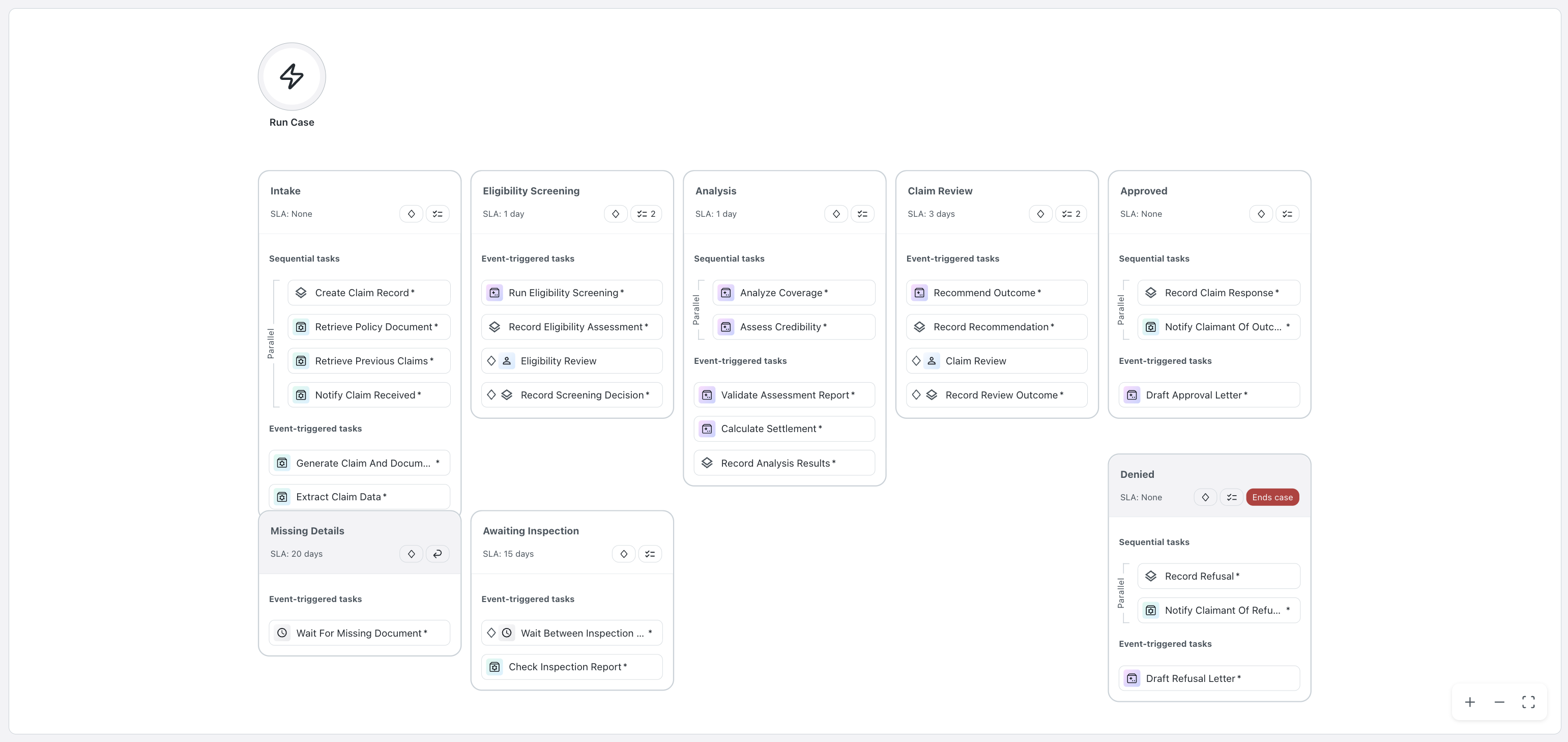
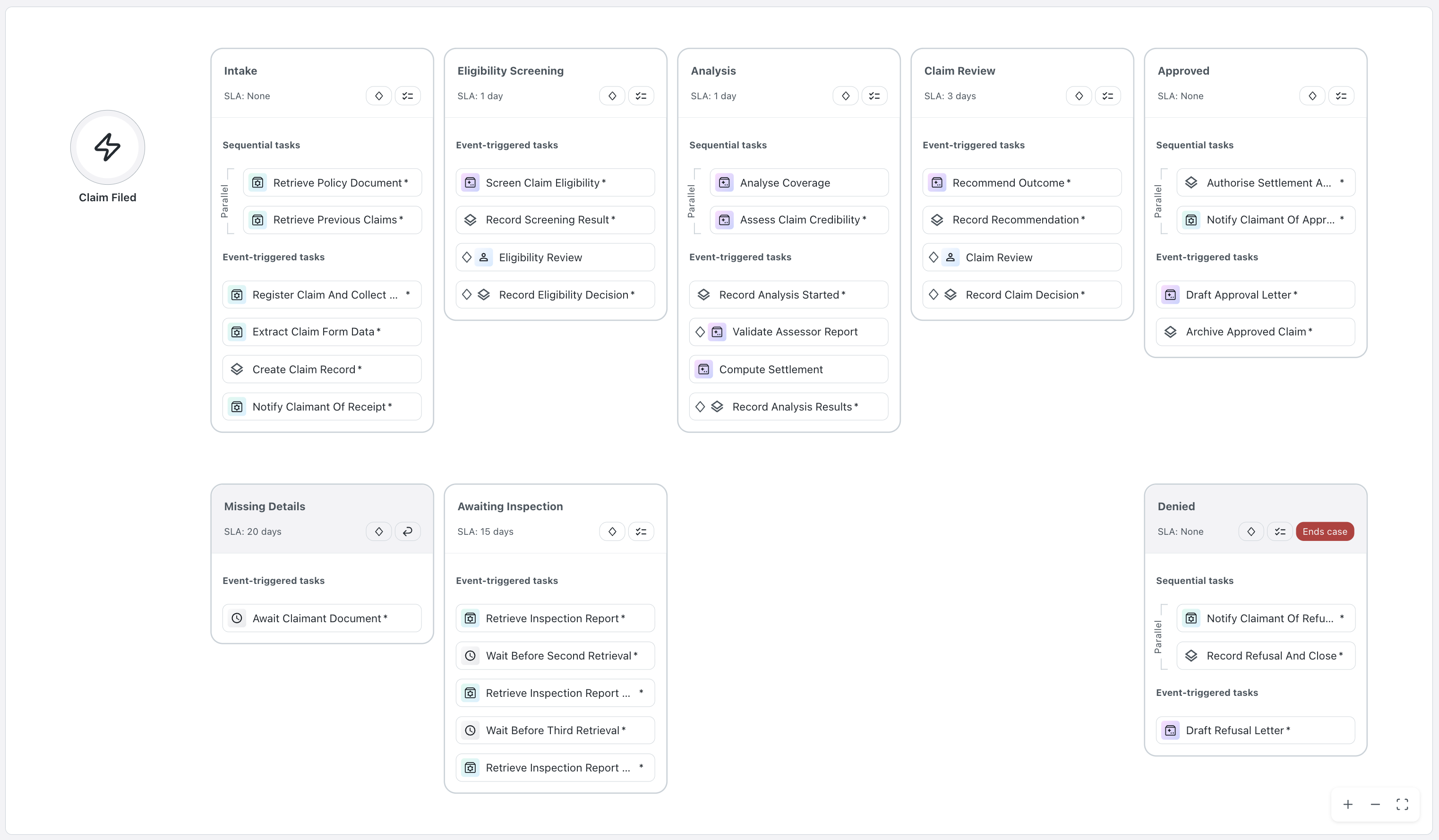
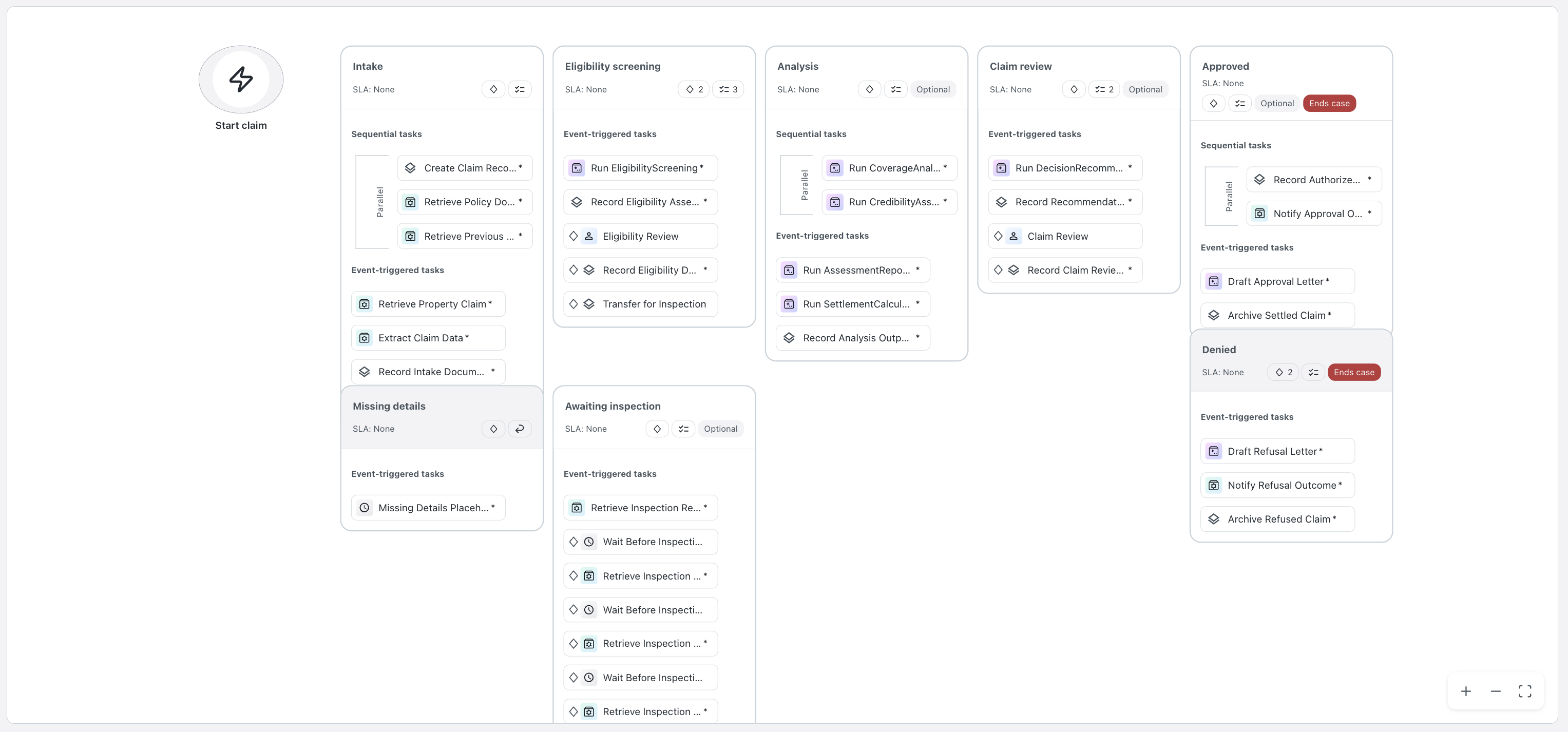
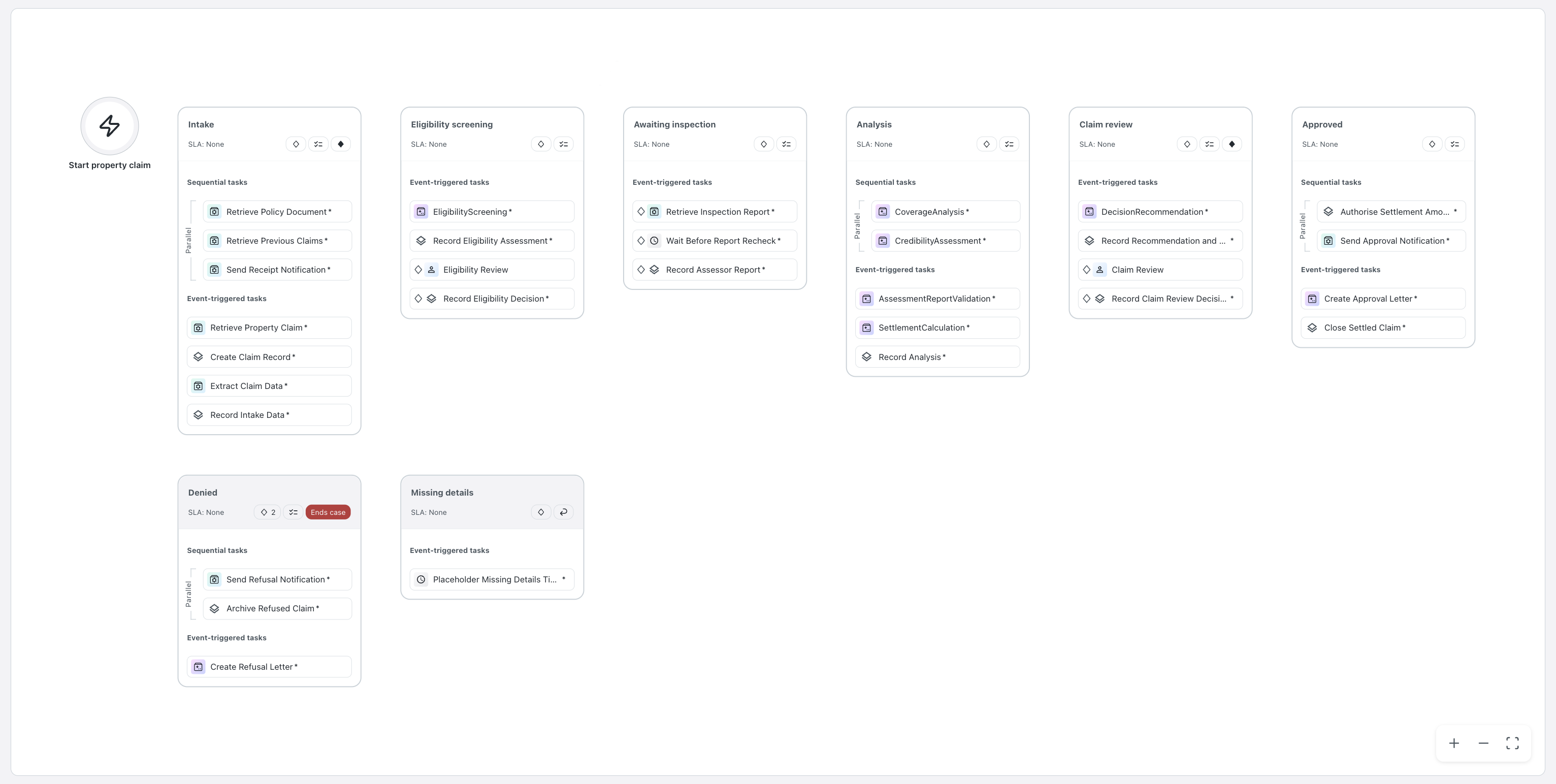
The diagram is a deliverable. A case plan a business user cannot follow is a case plan nobody signs. Open it in Studio Web and read it as they would.
Four case plans came from four different models and one PDD. The stages and gates the process requires are in every one of them, and everything else differs. The first tab is what they were all asked for: the seed cookbook's own mock of the diagram.
From 3d-case/cookbook.md, the picture every model laid its stages against:
    ┌────────┐   ┌───────────┐   ┌──────────┐   ┌──────────┐   ┌──────────┐
 ●─▶│ Intake │──▶│ Screening │──▶│ Analysis │──▶│  Review  │──▶│ Approved │
    └────────┘   └───────────┘   └──────────┘   └──────────┘   └──────────┘
         │             │                                       ┌──────────┐
         ▼             ▼                                       │  Denied  │
    ┌───────────┐ ┌───────────┐                                └──────────┘
    │  Missing  │ │ Awaiting  │
    │  details  │ │inspection │
    └───────────┘ └───────────┘
The design was each model's own: the PDD names no products and no stages, so the shape is a decision, not a transcription. What makes all four compatible solutions is the pinned contracts underneath; what makes them different is everything the contracts deliberately leave to the designer. You'll see the same effect on the app screens at 3f.