Create the Claim Record (Block 3b)¶
The PDD asks for a store that outlives any single step and can be read while the claim is in flight. That is a Data Fabric entity, and this block builds it: one entity, in your seat folder, on the pinned schema from contracts/claim-entity.md.
The schema is pinned, and the contract itself explains why: every seat builds a compatible record, so one reference screen can read any seat's claim and letters compare across seats.
The prompt¶
# Build — the claim entity in Data Fabric

`PDD.md` §1.5 P5 asks for a store that outlives any single step and can be read while the claim is in flight. That is a **Data Fabric entity**; build it.

The schema is `contracts/claim-entity.md` and it is **pinned** — that file says why, and it is worth reading before you decide to improve a name.

Use the **`uipath-platform`** skill — its Data Fabric section owns `uip df`. The entity goes in **your seat folder**, not at tenant level — `CONFIG.md`, *The claim entity*. Read the contract's five column tables and its casing rule; the rest of that file is for the block that writes the entity (`3d`).

**Get the schema right in one create**, from a file: it is one call and no repair.

**Done when** you have written a value with cents and a nine-thousand-character payload into it, read both back unchanged, and deleted the row you used. That round trip validates correct set of limits.
Steps:
- Read
contracts/claim-entity.md(pinned schema, five column tables, casing rule) andCONFIG.md - Load the uipath-platform skill (
uip df) - Create the entity in the seat folder
- Round-trip: write cents and a 9,000-character payload, read both back unchanged, delete the test row
- Record the entity name and folder GUID in
PROGRESS.md
What the agent will review¶
- One create, from a file. Update takes a different body shape from the one
getreturns, so the natural read-edit-write loop does not work here. Creating fresh from a schema file is one call and no repair. - Two budgets, and they are not the same number. JSON columns hold 10,000 characters, and every producer budgets 8,000 in its prompt; that headroom is part of the contract. Separately, every consumer's summed inputs must stay under the platform's cap on serialized arguments. Your SDD already states both as arithmetic; this is where the numbers become real.
- The connection is shared, and that's deliberate. Authorizing a Data Fabric connection is an interactive OAuth consent. One shared connection serves every seat.
The gate¶
The round-trip is the gate: a value with cents and a 9,000-character payload written, read back unchanged, and the test row deleted. Round-trip before you build on it: a store you have only written to is a store you know half of.
Proof¶
The entity as built, in Data Fabric, with the contract's numbers visible on it: the analysis columns as Multi-line Text at max length 10,000, reviewerNotes at 4,000, reviewRequired as a typed Yes/No:
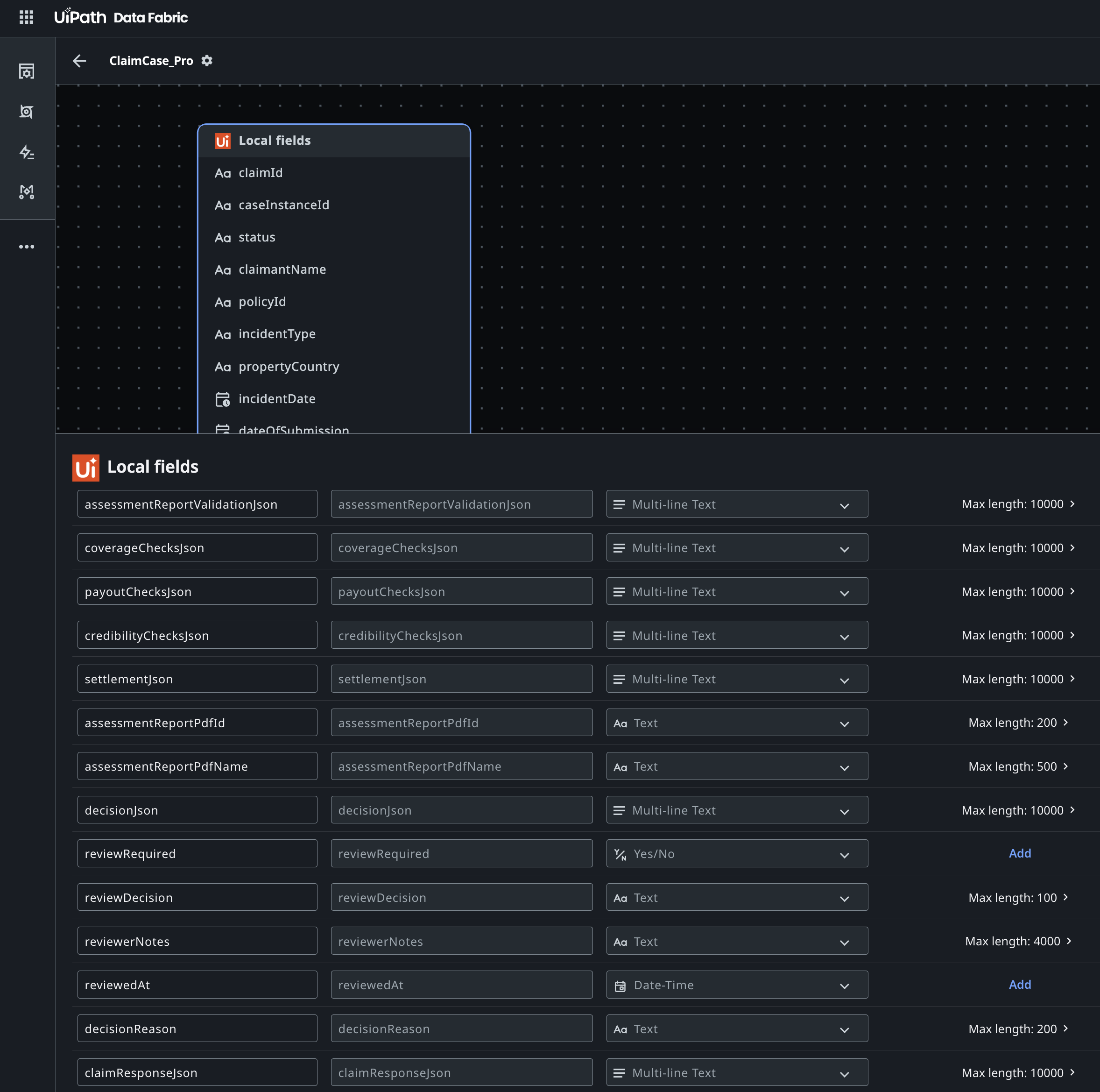
The table exists in your seat folder on the pinned schema, and a real row survived the round-trip.