Part 2 : Generative Extractor in IXP
🎯 Learning objectives
- Explain what IXP Generative Extraction is and which document types it is designed for
- Identify when to use IXP Generative Extraction vs. Document Understanding or Communications Mining
- Build a Generative Extraction project: create, upload documents, define taxonomy, validate predictions
- Evaluate model performance using precision, recall, and F1 metrics
- Publish and consume a Generative Extraction model in a UiPath Studio workflow
- Apply prompting best practices at project, field group, and field levels
Theory : Understanding IXP Generative Extraction
What is IXP Generative Extraction?
The Unstructured and Complex Documents capability in UiPath IXP uses Generative Extraction to process documents that are too complex or variable for traditional rule-based or template-based methods. It is an inference-first experience that provides zero-shot and few-shot extraction — meaning it can extract data from documents it has never seen before, guided purely by natural language prompts.
This capability converts unstructured document content into structured, actionable data for automation and analytics — without requiring ML model training or positional rules.
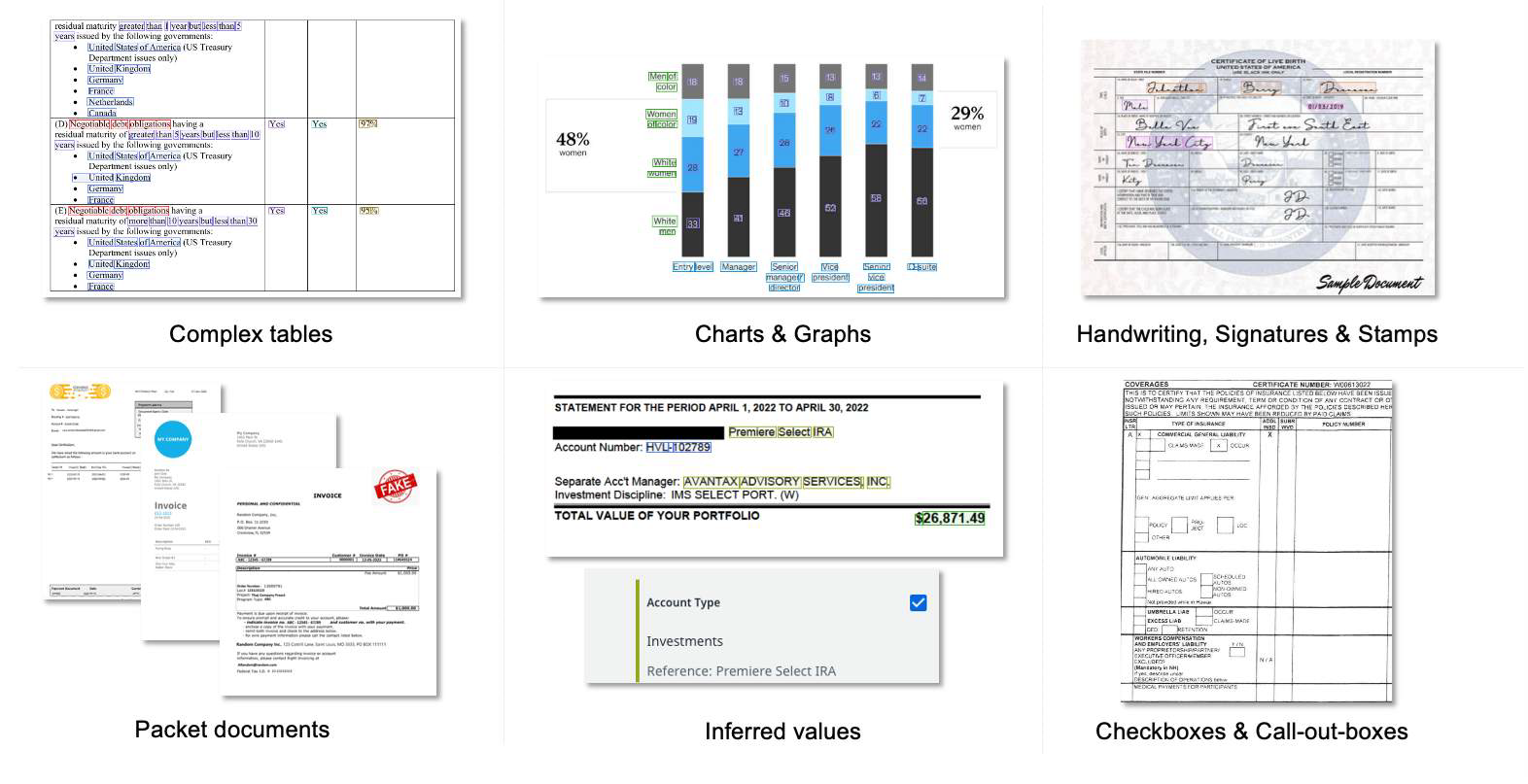
IXP Generative Extraction handles a wide range of complex document elements
When to Use IXP Generative Extraction
This capability is ideal for advanced document processing scenarios where data is not consistently formatted. Use it when one or more of the following apply:
Supported File Formats
User Roles in Generative Extraction
Generative Extraction Prompting Best Practices
The quality of your prompts directly determines extraction accuracy. Well-written instructions unlock the full potential of the generative model.
Project-Level Instructions
- Briefly describe the industry and document type (e.g., "This is a US payroll paystub from the HR/Finance industry")
- Mention any special characteristics of the document (multi-page, scanned, handwritten sections)
- If the document may contain multiple instances of the same data, include a unique identifier field in every field group
Field Group-Level Instructions
- Choose clear, recognizable names — use the same terminology as in the documents
- Group related data points together logically
- Explain how the field group contributes to the document's overall meaning
- Indicate the likely location or section in the document (e.g., "Found in the top-right header section")
- Treat each field group as a table — each field is a unique column
- Use
>to create parent-child relationships (e.g., Paystub > Deductions)
Field-Level Instructions
- Start every instruction with "Extract…"
- Specify the exact format and structure of the expected output (e.g., "Extract as DD/MM/YYYY")
- Provide example inputs and expected outputs for complex or ambiguous fields
- Focus on one piece of data per instruction — don't overload a single field
- Select the appropriate data type: Text, Number, Date, or Boolean
- For inferred fields, describe the derivation logic (e.g., "Extract net pay — calculated as Gross Pay minus total deductions")
General Prompting Rules
| Rule | Guidance |
|---|---|
| Clarity & Simplicity | Use clear, direct, unambiguous language. Avoid complex nested sentences. |
| Consistency | Use the same terminology across project, field group, and field instructions. |
| Provide Context | Give the model relevant industry and document-type context at the project level. |
| Iterate | Write → Test → Edit → Save. Repeat until extraction quality is satisfactory. |
| Avoid Negative Instructions | Instead of "Don't skip sections", say "Ensure all earnings sections are captured". |
| Avoid Repetition | Repeating instructions across levels causes confusion and reduces accuracy. |
| Avoid Contradictions | Ensure project, field group, and field instructions do not conflict with each other. |
| Positive Examples | Include examples of correct responses to guide the model (few-shot). |
📝 Recap
- IXP Generative Extraction provides zero-shot and few-shot extraction for complex, unstructured documents — no ML training or positional rules required.
- Best suited when documents have complex elements (nested tables, charts, handwriting), inferred values, high layout variation across vendors/agencies, or are packet documents combining multiple document types in one file.
- Six user roles govern access: Service Admin, Project Admin, Developer, Model Trainer, Analyst, and Viewer — each with a different scope of permissions.
- Prompting best practices apply at three levels — project (industry/document context), field group (clear names, logical grouping), and field (start with "Extract…", specify format) — plus general rules: be clear and consistent, iterate (write → test → edit), and avoid negative instructions, repetition, or contradictions.
✅ Knowledge check
1. What is the difference between zero-shot and few-shot extraction in Generative Extraction?
2. Which of the following is a field-level prompting best practice in Generative Extraction?
3. How do you consume a published Generative Extraction project in UiPath Studio?